Last.fm Global Hotkeys
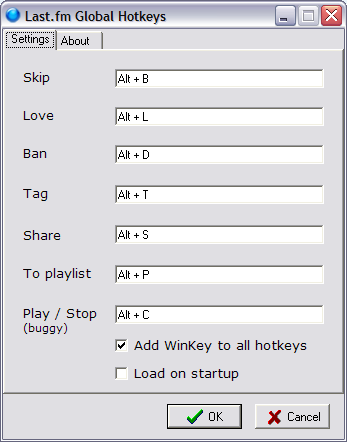
Last.fm doesn’t have out-of-the-box support for global hotkeys, which I think are a requirement for any music player. So I created a simple tool that will let you control the Last.fm for Windows app through global hotkeys.
Features
- Hotkeys for Skip, Love, Ban, Tag, Share and Add to playlist. Plus a buggy hotkey for Play/Stop, too 🙂
- Define your own key combinations.
- Minimize to system tray.
- Supports autorun.
- Portable. Settings will be saved in lastfm_hotkeys.ini in the program’s folder. If the .ini file is not found settings will be saved in the registry.
- Screenshot.
Download
lastfm_global_hotkeys.zip (559 KB)
I’ve only tested the application with Last.fm player 1.5.2.38918 on Windows XP. I have no idea whether it’ll work with other versions. Use at your own risk.
Known Issues
For some inexplicable reason the “Play/Stop” button in Last.fm behaves differently than the other buttons when I try to click it programmaticaly. Sometimes it gets stuck in disabled (grayed out) mode. I wasted two days trying to figure it out and got nowhere, so I’ve decided to leave it unfixed for now.
<rant>The Last.fm app uses the Qt framework which makes it very hard to control it externally. Things that look like buttons aren’t really buttons from the Windows API point of view, etc. Maybe an extension DLL would be a better solution, but I currently don’t feel like plodding through the Last.fm source code to figure out how to make an extension. Maybe someday.</rant>
Related posts : Subscribe via RSS
 Get Updates by Email
Hey, just wanna add feedback
Lastfm version 1.5.4.27091
Windows 7 Ultimate x64 RTM 7600
Works all right, all you have to remember is to not minimize last m window and you are good to go.
My main problem with the little app is that it doesn’t work when I’m full screen gaming :/
Therefore, it’s kinda useless to me…
Ty anyway ^^
Why cant I just make the hot key “left”. It auto adds ctrl and alt when I hit left. This is so I can use my MCE remote to skip and it only mimics certain keys.
Sorry, this application just doesn’t support single-key hotkeys.
Work Great on Win XP SP3 with 1.5.4 version of LastFM
The play/pause don’t work but it’s not the most important,
Thx great app !